

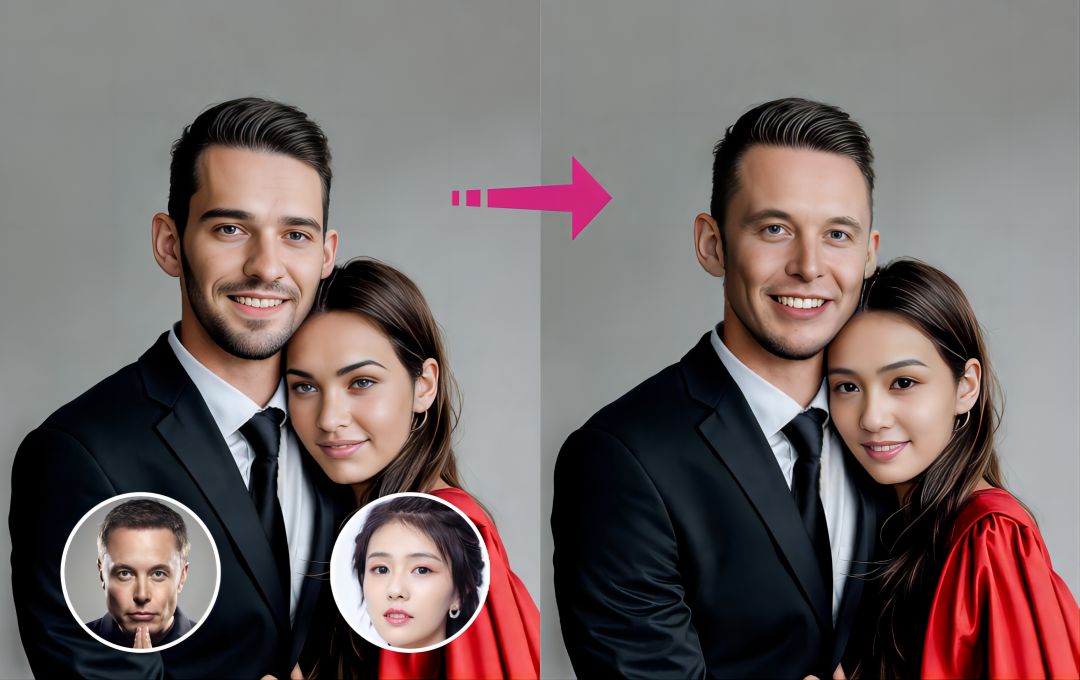
Face swap technology has evolved from a novelty feature into a professional content creation tool. As of October 2025, AI-powered face swapping delivers studio-quality results that creators, marketers, and developers rely on daily.
After two weeks of hands-on testing across platforms, I evaluated dozens of face swap tools based on output quality, processing speed, ease of use, and pricing structure. This guide reveals which platforms deliver the most realistic swaps and best value for different use cases.
Quick Comparison: Best Face Swap Websites at a Glance
|
Tool |
Best For |
Modalities |
Platforms |
Free Plan |
Starting Price |
| Magic Hour | Professional creators & developers | Photo, Video, GIF | Web, API | Yes (10 images, 3 videos daily) | $10/month |
| DeepSwap | High-definition video swaps | Photo, Video, GIF | Web, Mobile | No | $19.99/month |
| Reface | Social media content | Photo, Video, GIF, Avatars | iOS, Android | Yes (limited) | $12.99/month |
| Snapchat | Real-time face swapping | Live Camera, Photo | iOS, Android | Yes (free) | Free |
| FaceHub | Quick online swaps | Photo, Video | Web | Yes | $9.99/20 credits |
| Pixelz.AI | Browser-based editing | Photo | Web | Yes (limited) | $4.99/month |
| FaceFusion | Customizable blends | Photo | Web, Mobile | Yes | Varies |
1. Magic Hour
Magic Hour has surpassed 5 million users in 2025, establishing itself as the leading AI video creation platform with the latest Face Swap technology at its core. The browser-based tool eliminates software downloads while delivering professional-grade results.
What sets Magic Hour apart: The platform runs entirely in your browser with no installation required, yet maintains studio-quality output at up to 4K resolution. The AI handles complex lighting conditions, multiple angles, and expressions with frame-by-frame precision tracking.
Pros:
- Zero installation required – Works directly through any browser on desktop, tablet, or mobile
- Developer-ready API – Integrate face-swapping features into custom applications and workflows
- Multi-tool ecosystem – Combines face swap with text-to-video, lip sync, animation, and style transfer in single projects
- Free tier available – 10 image swaps and 3 video swaps daily without payment
- Commercial usage included – All generated content can be used in marketing campaigns and client work
- 4K resolution support – Professional-grade output quality for premium projects
- Automatic lighting adaptation – Maintains natural appearance across different footage conditions
Cons:
- Free version includes watermarks
- Advanced features require paid subscription
- Processing queue can slow during peak usage times
My evaluation: After testing Magic Hour extensively across different project types, the seamless workflow stands out immediately. I uploaded various source materials – from well-lit studio shots to challenging outdoor footage – and the AI consistently maintained natural facial mapping.
The real value emerges when combining tools. Starting with a face swap, applying a style transfer to match a brand theme, then finishing with lip-sync adjustments for audio alignment creates polished content in minutes rather than hours. For creators who need both quality and speed, this combination is hard to beat.
Pricing:
- Free Plan: 400 frames (~33 seconds) at 512×512 resolution
- Creator Plan: $10/month (annual) – 120,000 frames/year (~166 minutes) at 1024×1024 resolution
- Pro Plan: $49/month (annual) – 600,000 frames/year (~13 hours) at 1472×1472 resolution
- Business Plan: $249/month (annual) – 3,000,000 frames/year (~69 hours) at 4K resolution
2. DeepSwap
DeepSwap delivers deepfake-level quality with proprietary models achieving over 90% face swap similarity. The platform specializes in handling challenging scenarios like multiple faces, complex lighting, and extended video lengths.
Key differentiator: DeepSwap’s custom-built AI models surpass many open-source alternatives by 20% in similarity ratings. The platform processes one-minute videos in approximately 10 seconds using high-performance GPUs.
Pros:
- 90%+ similarity rate – Industry-leading accuracy for realistic swaps
- Multi-face capability – Swap up to six faces simultaneously in single clips
- 4K HD output – Professional-grade video quality
- Ultra-fast processing – One-minute videos processed in ~10 seconds
- Handles 16+ challenging scenarios – Optimized for various angles, lighting, and occlusions
- Additional tools included – Background removal and AI image enhancement
Cons:
- No free trial available
- Credit-based system can get expensive for heavy users
- Some users report content getting incorrectly flagged
- Recent price increases have frustrated existing customers
My evaluation: DeepSwap excels when you need polished, believable swaps for professional applications. I tested the multi-face feature on group videos, and the AI maintained consistency across all subjects even with varying lighting conditions.
The ShapeTransformer V2.0 model consistently produced more realistic results than the ShapeKeeper option, especially for longer clips. However, at 1 credit per 15 seconds of video, costs accumulate quickly for frequent users.
Pricing:
- Monthly Subscription: $19.99/month – 20 credits
- Annual Subscription: $49.99/year – 20 credits monthly
- Additional credits available at discounted rates for premium members
3. Reface – Best for Viral Social Media Content
Reface built its reputation on entertainment value and viral marketing, amassing over 250 million users worldwide. The app prioritizes speed and shareability over technical perfection, making it ideal for social media creators.
Platform strength: Extensive template library with thousands of pre-configured scenes, GIFs, and videos. Content integrates directly with social sharing platforms for instant distribution.
Pros:
- Massive template library – Thousands of pre-configured scenes and memes
- AI avatar generation – Create personalized digital avatars for various uses
- Photo animation – Make static portraits talk or sing
- Quick processing – Generate content in seconds
- Social integration – Direct sharing to Instagram, TikTok, WhatsApp
- Regular content updates – Fresh templates added frequently
Cons:
- Accuracy varies significantly between templates
- Older templates show inferior AI training
- Free version heavily ad-supported
- Watermarks on free content
- Some users report misleading pricing practices
My evaluation: Reface delivers exactly what it promises – fast, fun content perfect for social media. The face swap quality isn’t as polished as Magic Hour or DeepSwap, but that’s not the point. This tool excels at creating shareable moments quickly.
Template quality varies noticeably. Newer additions show better AI training and more realistic results, while older options can look obviously fake. For creators focused on viral potential over technical perfection, Reface remains a solid choice.
Pricing:
- Basic Plan: $12.99/month – 100 face swaps, no ads, no watermarks
- Premium Plan: $29.99/month – Unlimited swaps, priority processing, premium support, Video Restyle
- Weekly Plan: $7.79/week – Access to templates, no watermarks
- Annual Option: Best value at significant discount
4. Snapchat Face Swap
Snapchat pioneered mainstream face swapping in 2016 and remains one of the easiest platforms for real-time effects. The AR-powered lens swaps faces instantly through your camera feed.
Platform advantage: No uploads, no processing wait, no editing required. Point your camera at two faces and the swap happens live on screen.
Pros:
- Completely free – No subscription or purchases required
- Real-time processing – Instant face swaps through camera
- Pre-installed for millions – Most users already have the app
- Simple to use – No learning curve or technical knowledge needed
- Works with photos – Can swap faces from camera roll
- Massive AR filter library – Layer face swap with other effects
Cons:
- Limited refinement options – Can’t adjust or enhance results
- Lower quality output compared to AI-powered tools
- Export limitations – No high-resolution downloads
- Detection inconsistencies – Struggles with certain angles or lighting
- Not suitable for professional projects
My evaluation: Snapchat face swap isn’t competing with professional tools, and that’s perfectly fine. For spontaneous fun, quick content, or testing concepts, nothing beats the instant gratification of real-time swapping.
The quality won’t impress clients or work for polished campaigns, but for casual creators and social experimentation, Snapchat delivers the fastest path from idea to execution. It’s the tool you already have when inspiration strikes.
Pricing:
- Free: All features available at no cost
5. FaceHub
FaceHub operates as a web-based tool requiring no downloads or installations. The credit-based system provides flexibility for occasional users who don’t want monthly subscriptions.
Key benefit: Pay-as-you-go pricing model means you only spend money when actually using the service, making it cost-effective for infrequent face swapping needs.
Pros:
- No installation required – Works through web browser
- Credit-based pricing – Pay only for what you use
- Multiple face swap – Handle several faces in single images/videos
- No mandatory subscription – Purchase credits as needed
- Template library – Pre-made options to speed up creation
- Additional AI tools – Image generator, video generator, anime converter
Cons:
- Limited free version
- Credit costs can add up for regular users
- Fewer advanced features than premium platforms
- Processing speed varies during peak times
My evaluation: FaceHub fills a specific niche – users who need occasional face swaps without committing to monthly fees. The credit system works well if you’re swapping faces once or twice monthly rather than daily.
Quality sits in the middle range. Results look good for social media and casual projects, but won’t match Magic Hour or DeepSwap for professional applications. For budget-conscious creators testing the waters, FaceHub offers a sensible entry point.
Pricing:
- Credit Packages: Starting at $9.99 for 20 credits
- Credits include premium features like multiple face swaps
- No watermarks with paid credits
- Unused credits don’t expire
6. Pixelz.AI
Pixelz.AI impressed during testing with sophisticated facial mapping technology wrapped in a clean, accessible interface. The web-based approach eliminates installation hassles while delivering results that often surpass mobile alternatives.
Technical edge: Advanced facial recognition accurately handles challenging angles and varying skin tones. The platform maintains consistent blend quality across different lighting conditions.
Pros:
- No installation needed – Pure web-based functionality
- Clean user interface – Intuitive design for quick workflows
- Handles challenging photos – Manages difficult angles effectively
- Consistent across skin tones – Maintains quality regardless of complexion
- Resolution options – Choose output quality based on needs
- Fast processing – Quick turnaround on most swaps
Cons:
- Free version has resolution limitations
- Usage caps on free tier
- Primarily focused on photos (limited video support)
- Performance decreases with low-resolution source images
My evaluation: I tested Pixelz.AI with well-lit portraits and challenging outdoor photos. The tool excelled consistently with proper source material, maintaining natural facial blends even when working across different lighting conditions.
Performance did drop noticeably when using low-resolution or poorly lit source images. If you’re working with quality source material and need reliable browser-based swapping, Pixelz.AI delivers solid results at an affordable price point.
Pricing:
- Free Version: Available with resolution and usage limitations
- Paid Plan: $4.99/month for enhanced features and higher quality output
7. FaceFusion
FaceFusion targets users who want manual control over their face swaps. While most platforms automate everything, FaceFusion provides tools to adjust alignment, tweak blending strength, and refine how faces morph together.
Unique approach: Acts as a creative playground rather than a plug-and-play solution, ideal for artistic projects where precision matters more than speed.
Pros:
- Manual adjustment options – Control alignment and blending strength
- Creative flexibility – Perfect for stylized edits and artistic blends
- Handles imperfect sources – Works with photos that don’t align perfectly
- Morphing capabilities – Blend faces gradually rather than hard swaps
- Regular updates – Active development with new features
- Multiple output options – Various export formats and quality levels
Cons:
- Steeper learning curve than automated tools
- Slower workflow due to manual adjustments
- Not ideal for batch processing
- Less suitable for quick social media content
My evaluation: FaceFusion serves a different audience than tools like Magic Hour or Reface. I spent considerably more time per swap, but achieved results that felt more intentional and artistic.
The ability to adjust blending strength proved valuable when working with source photos taken under different conditions. If you’re creating one-off artistic pieces or need precise control for specific projects, the extra time investment pays off. For volume work or quick social content, choose a more automated solution.
Pricing:
- Varies by platform and implementation
- Free versions available through various channels
- Premium features require payment
How We Chose These Face Swap Tools
I spent two weeks testing over 20 face swap platforms to identify the best options for different user needs. Here’s my evaluation methodology:
Output Quality (40% of score)
- Facial mapping accuracy and natural appearance
- Lighting adaptation and skin tone matching
- Expression preservation and movement tracking
- Edge blending and seamless integration
- Performance across different angles and conditions
Ease of Use (25% of score)
- Setup time and learning curve
- Interface intuitiveness and workflow efficiency
- Processing speed and reliability
- Export options and file format support
Feature Set (20% of score)
- Photo vs. video capabilities
- Batch processing and multi-face support
- Additional tools and creative options
- Resolution options and quality settings
- API availability for developers
Value Proposition (15% of score)
- Free tier availability and limitations
- Pricing structure and credit systems
- Commercial usage rights
- Cost per swap calculation for regular users
I tested each platform with identical source materials: professional headshots, casual selfies, group photos, and challenging outdoor footage. This consistent approach revealed strengths and weaknesses across different scenarios.
The Face Swap Market Landscape in 2025
Face swap technology has matured significantly over the past year. Three major trends are reshaping the industry:
- AI model improvements are closing the quality gap. Open-source models like Stable Diffusion and proprietary systems have achieved similarity rates above 90%, making even budget tools capable of convincing swaps. The difference between platforms increasingly comes down to speed, ease of use, and additional features rather than basic swap quality.
- Integration is becoming standard. Face Swap platforms no longer operate in isolation. Tools like Magic Hour combine face swapping with video editing, animation, and style transfer in unified workflows. This ecosystem approach saves time and maintains consistency across complex projects.
- Ethical considerations are driving platform policies. As face swap technology becomes more accessible and convincing, platforms are implementing stricter content policies and detection systems. Responsible use guidelines now accompany most professional tools, with some platforms requiring verification for certain use cases.
- Emerging tools worth watching: Several newer platforms are gaining traction in specific niches. Swapface focuses on live streaming and real-time applications for content creators. HeyGen targets business use cases with AI spokesperson capabilities. ComfyUI offers maximum customization for technical users through node-based workflows.
The market continues fragmenting into specialized solutions rather than one-size-fits-all platforms. Casual users have free mobile apps, social media creators have quick-sharing tools, and professionals have API-powered solutions for production workflows.
Final Takeaway: Which Tool Should You Choose?
Selecting the right face swap platform depends entirely on your specific needs:
- Choose Magic Hour if you need professional-quality results with developer flexibility. The API access, browser-based workflow, and 4K output make it ideal for businesses, agencies, and serious creators who produce content regularly.
- Choose DeepSwap if video quality matters most and you’re working on high-stakes projects where realism is non-negotiable. The 90%+ similarity rate and multi-face capabilities justify the higher price for professional applications.
- Choose Reface if you’re creating social media content where speed and viral potential outweigh technical perfection. The massive template library and instant sharing make it perfect for influencers and social managers.
- Choose Snapchat if you need real-time swapping for casual fun or quick concept testing. Free, instant, and already installed on millions of devices makes it the path of least resistance.
- Choose FaceHub if you only need occasional face swaps and prefer paying per use rather than monthly subscriptions. The credit system provides flexibility for irregular users.
- Choose Pixelz.AI if you work primarily with photos in a browser and want reliable results without software installation. The clean interface and consistent quality make it a solid mid-range option.
- Choose FaceFusion if you’re creating artistic projects requiring manual control over blending and morphing. The extra time investment enables unique results impossible with automated tools.
- My recommendation: Start with the free tiers. Test Magic Hour’s daily free swaps to evaluate quality against your needs. Try Snapchat for real-time capabilities. Experiment with Reface’s templates if social media is your focus.
Once you’ve identified your primary use case, invest in the tool that matches your workflow. Don’t pay for features you won’t use, but don’t compromise on quality if your projects demand professional results.
The face swap market offers genuine options for every budget and skill level. I guarantee at least one of these tools will meet your needs.
Frequently Asked Questions
Are face swap tools safe to use?
Reputable platforms like Magic Hour, DeepSwap, and Reface prioritize user privacy with encryption and clear data policies. Magic Hour doesn’t store uploaded media after processing, while Reface deletes user images within 24-48 hours. Always review privacy policies and use platforms with transparent data handling practices. Avoid unknown tools that lack clear policies or security measures.
Can I use face-swapped content commercially?
This depends on the platform. Magic Hour explicitly includes commercial usage rights for all generated content. DeepSwap and Pixelz.AI also allow commercial use with paid plans. Always verify licensing terms before using swapped content in marketing campaigns, client work, or revenue-generating projects. Free tiers often restrict commercial usage.
Which face swap tool works best for videos?
Magic Hour and DeepSwap lead for video face swapping. Magic Hour offers better overall value with its ecosystem approach and 4K support, while DeepSwap excels at challenging scenarios with multiple faces. For quick social media videos, Reface provides adequate quality with faster processing. Avoid photo-only tools like Pixelz.AI for video projects.
Do I need technical skills to use face swap software?
No. Modern platforms are designed for non-technical users. Magic Hour, Reface, and Snapchat require no special skills – just upload images and let the AI handle processing. DeepSwap and FaceHub offer slightly more options but remain accessible to beginners. Only advanced tools like FaceFusion or ComfyUI require technical knowledge.
How much do face swap tools cost?
Pricing ranges from free (Snapchat) to $249/month (Magic Hour Business plan). Most creators find adequate solutions between $10-30 monthly. Magic Hour’s Creator plan at $10/month offers excellent value for regular users. DeepSwap starts at $19.99/month. Credit-based options like FaceHub provide flexibility for occasional users. Free tiers work well for testing and light usage.